Skip to content

Ops management + workflow builds

Keep your tools. Lose the busywork.

The operator your business is missing. We fix the admin bottlenecks capping your growth, without adding headcount or new software. No dashboards nobody opens. No strategy decks. Systems that run your business when you are not looking at them.

  • Based in Sacramento
  • Ops management
  • Builds, not decks

The name

Yui (YOO-ee)

Yui is an old Japanese practice where neighbors traded labor: a roof to mend, a field to harvest, a house to build. Nobody invoiced anybody. You showed up because the help would come back around when it was your turn.

That is the standard I am trying to hold. Not a vendor relationship, and not charity either. It’s showing up like the outcome is also mine, because in practice it is.

The problem

The busywork lives in the gaps.

You have the software, the roles, and the processes. The busywork lives between them: tools that don’t share information, steps that outlived their purpose, and work sitting with the wrong person.

  • Tools that don’t talk

    Scheduling, invoicing, payroll, and the books each live in a different system. Your team jumps between them, types the same information twice, and the numbers rarely match.

  • Steps that outlived their purpose

    Approvals, reports, and checklists that made sense a few years ago are still running. Nobody would add them today, but they still take up time every week.

  • Work sitting with the wrong person

    Managers and senior staff spend part of their week on admin that a system or a junior hire could handle, instead of the work you hired them for.

  • 53%

    of small and midsize business leaders say data is often inconsistent across their business tools.

    Salesforce, 2024

  • 46%

    feel overwhelmed by too many business tools.

    Salesforce, 2024

  • 44%

    say there isn’t time to master all the technology their company uses.

    Salesforce, 2024

Salesforce, Small and Medium Business Trends Report, 6th edition. Survey of 3,350 leaders at companies with 200 or fewer employees, 2024.

96 min

Small business owners lose 96 minutes of productivity a day. Over a five-day week, that’s 8 hours.

Tool-related reasons owners gave

  • 3 in 10lose time searching for information in the wrong places
  • 29%repeat the same messages across platforms
  • 28%wait on status updates from multiple tools and people
  • 17%lose time switching between apps and tools

Slack survey of 2,000 U.S. small business owners, conducted by Talker Research, 2024.

Free diagnostic

Where is your operation bleeding.

Tool 01

Operations Health Check

Ten questions about how the business runs today. You get an operations score, the hours a week you are losing to manual work, and the gaps that are causing it.

Start the health check
Tool 02

Find My Bottleneck

Five questions, and we name the one constraint holding everything else up, plus one concrete thing you can do about it this week.

Find my bottleneck

5 or 10 questions · No email required · About 2 minutes

What we do

Three ways we take work off your plate.

  1. 01

    Connected systems

    Your job software, your books and your payroll each hold a piece of the answer. Nobody has time to assemble it, so the question goes unasked. We connect all three and give you the whole picture, built on the tools you already pay for.

    • One answer, without the hunt
    • Quote and proposal drafting
    • Reporting that writes itself
  2. 02

    Operations management

    We take the operating work off your plate and run it on a cadence: scheduling, receivables, vendors, the weekly numbers. Your processes get written down once, so they stop living in one person’s head.

    • Weekly operating rhythm
    • Documented, handoff-ready processes
    • Vendor and receivables follow-through
  3. 03

    Automation builds

    The handoffs between your tools become automatic. Intake to job, job to invoice, invoice to paid, paid to the report you actually read. We build it, we maintain it, and we hand you the keys.

    • Intake to invoice, end to end
    • No more double entry
    • Built on tools you own

How it works

Four steps, no mystery.

  1. Step 0115 minutes

    Fit call

    We ask what breaks most often and where your week goes. If we are not the right help, we say so on the call.

  2. Step 02Week one

    Game plan

    You get the short list: what we fix first, what it costs you today, and what it looks like once it is running.

  3. Step 03Weeks two to four

    Build

    We build the first working system and put it in front of your team. Working software, not a recommendation to go buy some.

  4. Step 04Month to month

    Ongoing support

    We keep it running, keep improving it, and keep taking the next thing off your plate. Month to month, with 30 days’ notice to cancel.

The work

Things we have actually shipped.

The live test is a real call, with the caller's details blurred. The custom build and both demos run on sample data. Watch the recordings, or open either demo and click around.

Live test

Missed-Call Follow-Up

A call goes unanswered. The caller gets a text back, their reply lands in the lead pipeline, and the owner gets one text asking whether it is a real lead. One reply qualifies it and sends the caller a booking link. Here the pipeline is a spreadsheet-style view, but that is only one way to set it up. We build around the tools you already have, so it feels familiar and is easy to use. In this test the first call was missed at 8:38 PM and the appointment was booked by 8:42. The caller's name, photo and number are blurred. The other pipeline rows are sample data.

  • Missed call to text back
  • One reply qualifies the lead
  • The caller picks the time
Custom build

Connected Operations Hub

Built for a business running five platforms: Jobber, QuickBooks, Gusto, HubSpot, and Square. We connected them into one hub the owner directs from a chat. Here the owner asks which finished jobs still need an invoice, and it finds $14,600 sitting unbilled across ten jobs and drafts every invoice for one-click approval. Shown with a fictional business and invented customers.

  • Five platforms, one hub
  • Directed by chat, in plain language
  • It drafts the work, you approve it
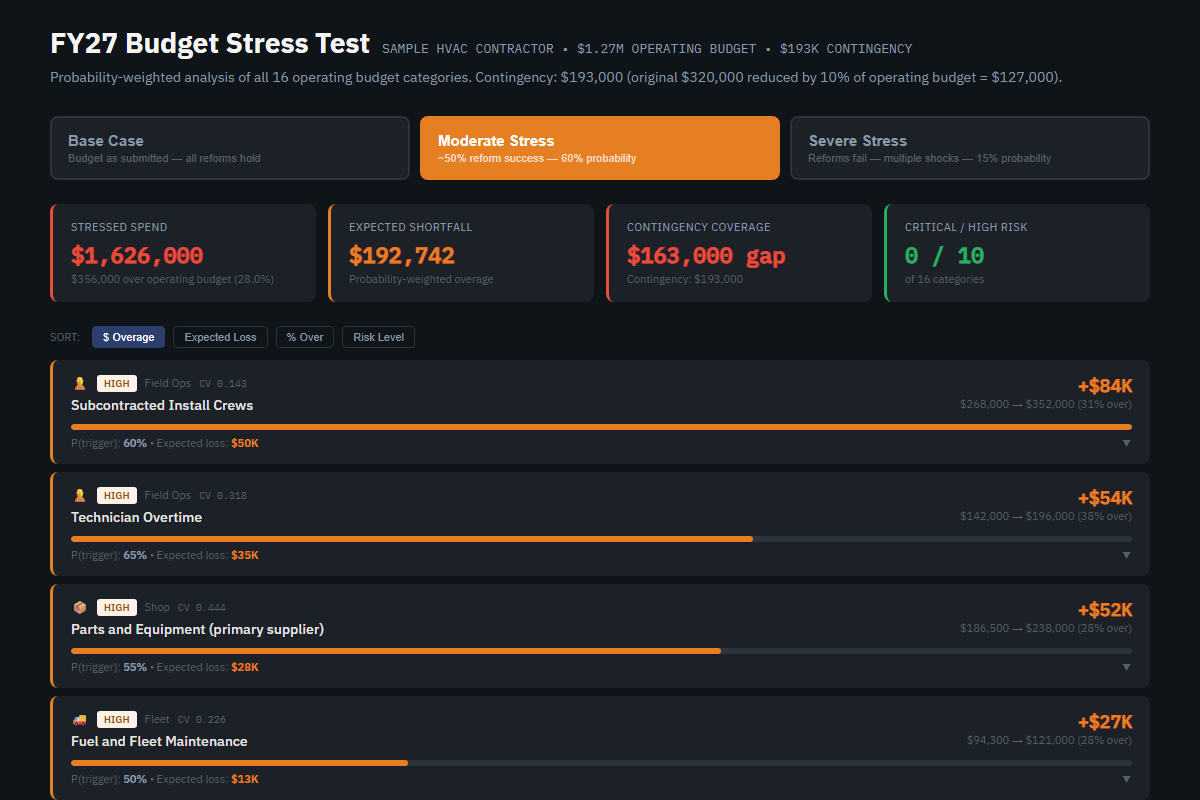
The Budget Stress Test dashboard showing sixteen budget categories ranked by expected loss, with base, moderate and severe scenarios.
Demo

Budget Stress Test

Sixteen budget lines, each with a probability of blowing past plan and by how much. It shows the expected shortfall before the year starts, and whether the contingency actually covers it. The real one stress tested the athletics budget at William Jessup University. This demo runs invented numbers for a fictional contractor.

  • Probability-weighted, not a best guess
  • Ranks lines by expected loss
  • Shows the gap before it happens
Open the demo →
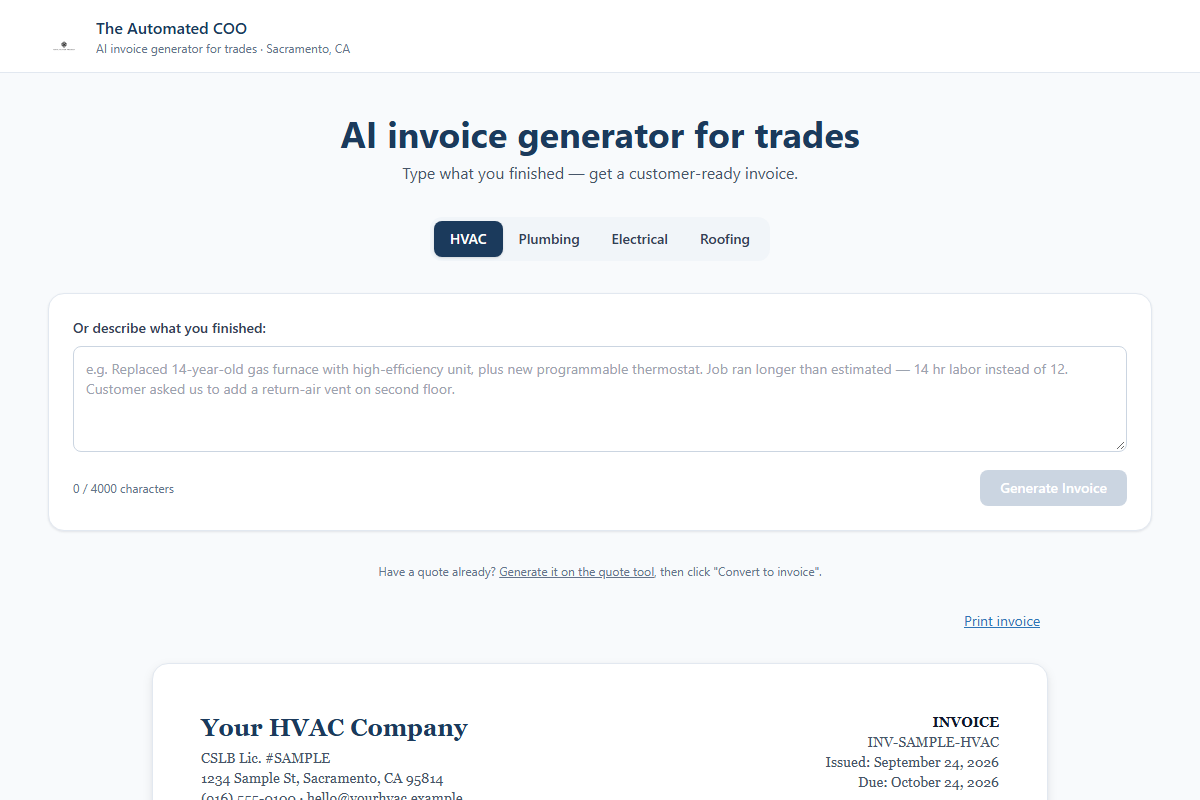
The automated invoice generator showing a plain-language description of finished work converted into a formatted customer invoice.
Demo

Automated Invoicing

A tech types what they finished in plain language. It comes back as a customer-ready invoice with line items and pricing, without anyone opening a template. Demo build, running sample jobs.

  • Plain text in, invoice out
  • Built for trades work
  • No double entry
Open the demo →

Pricing

Plain numbers, no surprises.

Start with an assessment or go straight to a build. The monthly plans are month to month. We would rather earn them than lock you in.

one day, on-site or remote

Ops Assessment

$1,500

First call is free

A full day inside your operation. We find where time, margin, and capacity are leaking, and leave you a ranked plan to fix it.

  • A full day on-site with your operations manager
  • Where your time and money actually go
  • A software audit: duplicate seats, overlapping tools, and shelfware to retire
  • A ranked to-do list you can work through yourself
  • The full $1,500 counts toward your first month if you sign on within two weeks of your results
Book a fit call
one-time

Workflow Sprint

$3,500+

Starting price · fixed before we start

Pick the one bottleneck eating your week. We fix the process first, then build the system that runs it.

  • One process, connecting up to 2 of the systems you already use
  • For example: a new inquiry becomes a scheduled job; a closed job sends its invoice; vendor bills land in QuickBooks matched to the PO
  • Scope signed off in week one, working by week four
  • More than 2 systems? We split it into phases and price each one before we start
  • A 1-hour handoff with the person on your team who’ll own it
  • Written instructions, so you never depend on us
  • Fixes for 30 days after launch
  • After that, run it yourself, or we’ll keep it running for $500 a month
Book a fit call
per monthRecommended

Ops Essential

$5,000

1 Workflow Sprint at a time

One Workflow Sprint always in progress, and a monthly check that your numbers agree across systems.

  • One Workflow Sprint in progress at a time: one process, up to 2 systems, one location
  • A 30-minute priorities meeting every other week
  • A monthly numbers review: whether your job, billing, and payroll numbers match across systems, and what to fix where they don’t
  • Clean numbers all year, ready for your CPA at year-end and your workers’ comp audit
  • A monthly report: what we built, how often it ran, and the hours and dollars it’s saved since you joined
  • Every 3 months: your next 3 builds, ranked by what each one saves
  • Everything we build for you kept running while you’re on the plan
Book a fit call
per month

Ops Growth

$10,000+

Starting price · 2 Sprints at a time*

Two builds at once plus hands-on operations leadership, priced to your locations, systems, and team.

  • Everything in Essential, with a weekly 45-minute priorities meeting
  • Two Workflow Sprints in progress at a time
  • Builds across more than 2 systems or several locations, scoped in your Statement of Work
  • Team training when each build goes live
  • A quarterly software and vendor review: duplicate seats, overlapping tools, and renewals coming due
  • Margin by service line each month, from your job and payroll numbers
  • A delegation plan: which decisions come off your plate, who takes them, and by when
Book a fit call

Both monthly plans are a month-to-month subscription, with 30 days’ notice to cancel. Your monthly rate stays locked for as long as you stay on the same plan. Need more locations or systems than Essential covers? That’s Growth. *Growth starts at $10,000 a month and is priced in your Statement of Work, based on your locations, systems, and team size.

Prefer remote?

Same assessment, over video

If a site visit doesn’t fit your schedule or your location, we run the same one-day Ops Assessment online. One booking, one day, same report, same $1,500, credited in full to your first month if you start a monthly plan within two weeks of your results.

Before the day
View-only access
You grant read access to the systems you want reviewed. Nothing gets changed.
9:00 to 9:45
Owner alignment
Your priorities and where you think time and money are leaking.
10:00 to 12:00
Live walkthrough
Your team shares their screen while doing real job entry, invoicing and dispatch. We watch, we don’t interrupt.
12:00 to 1:00
Lunch
Cameras off.
1:00 to 3:00
Software review
Settings, duplicate seats, broken exports, and steps done twice. Your team only joins if we have questions.
3:30 to 4:15
Findings briefing
The top 3 fixes we found, before we sign off.

Written report within 3 business days, then a results meeting online. Paid when you book.

On-site or remote

Two ways to work with us. One price.

We’re based in Sacramento and work on-site across the area. Further out, we run the same plans remotely. The Workflow Sprints, the priorities meetings, and the reporting don’t change. What changes is where we work, not what you get.

Included either way

  • Same monthly price
  • 1 Workflow Sprint at a time on Essential, 2 on Growth
  • A priorities meeting every other week on Essential, weekly on Growth
  • The same reports on what we built and what it saved

On-site (Sacramento area)

  • We work inside your operation, at your location
  • Site visits whenever a Sprint needs eyes on the work

Remote

  • Reserved working time with us every week, booked when it suits your team
  • Priorities meetings over video, so nothing waits for a drive

Everything you get is written into your Statement of Work before you start.

What the alternative costs in Sacramento
Hire an ops manager
$118,460/yr
One person, still depending on staff or vendors to build anything
Hire an office supervisor
$77,350/yr
More management capacity, but the manual steps stay manual
Hire another admin
$55,020/yr
More payroll, and the broken process stays broken
Ops Essential
$5,000/mo
One build always in progress plus a monthly numbers review. No payroll tax, no benefits, month to month.

Salaries are median base pay before benefits, Sacramento-Roseville-Folsom metro, U.S. Bureau of Labor Statistics (OEWS, May 2025). Nationally, benefits add about 30% on top of wages for private employers (BLS, June 2026).

Custom engagements

Multi-location, a team to build alongside, or something that does not fit a tier? We scope those directly. Tell us what you are dealing with and we will tell you what it takes.

Email us
Daniel, the founder of Yui, in a studio headshot.

About

I have run the operations, not just advised on them.

I am Daniel. I have spent my career inside operations, managing $3.2B in assets at Folio Dynamix, running a soccer club of 900 players and 88 teams, and cutting $2M of cost as operations director of a Division II athletics department. Different worlds, same job: figure out what is actually broken, then build the thing that fixes it.

I started Yui because small businesses get the worst version of this help: consultants who leave a deck behind, or software nobody adopts. I would rather sit in your operation, build what it needs, and stay until it runs without me watching it.

  • $3.2B

    Assets managed

    Folio Dynamix

  • 900+

    Players and 88 teams run

    Greenhaven Soccer Club

  • $2M

    Cost reductions delivered

    William Jessup University

Credentials

More about Daniel →

Questions

Before you book.

Do we have to switch software?

No. We build on the tools you already pay for and connect them so they share information. A custom tool only comes in when nothing you own fits the job.

What access do you need to our systems?

For the assessment, view-only access to the systems you want reviewed. Nothing gets changed. Anything a build needs is written into the Statement of Work before work starts.

How does the $1,500 assessment credit work?

The full $1,500 counts toward your first month if you start a monthly plan within two weeks of your results. On-site and remote work the same way.

What does build management cover?

It keeps a finished build working, for $500 a month per build. We watch for failed runs, fix what breaks, and update the build when one of your systems changes how it connects. We reply within 1 business day. Anything new, like another step, another system, or a new report, is a new Workflow Sprint.

Who owns what you build, and what if we leave?

You do. Everything we build runs on accounts in your name, and any new service a build needs is billed to you directly, with the cost listed in your Statement of Work before work starts. If you leave, you keep every build and its written instructions, and we remove our access. Or keep us on any build for $500 a month.

Can we cancel a monthly plan?

Yes. Both plans are month to month, with 30 days’ notice to cancel. No annual contract.

Do you work with businesses outside Sacramento?

Yes. Remote clients pay the same monthly price and get reserved working time with us every week, with priorities meetings over video instead of site visits.

What happens on the fit call?

Fifteen minutes. We ask what breaks most often and where your week goes. If we are not the right help, we say so on the call.

You’re up.

Fifteen minutes, no pitch deck. Tell us what keeps breaking and we will tell you whether we can fix it, and what it would take.